Key takeaways
- ✓Your planning scheme sets your zone, overlays and clauses
- ✓Find it by searching your address on VicPlan
- ✓Read your zone and overlay codes first
- ✓The rules live in the Victoria Planning Provisions
How to Find Your Planning Scheme in Victoria
Every property in Victoria is covered by a planning scheme — the statutory rulebook that sets your zone, any overlays, and the clauses your project has to meet. Finding it is free and takes a few minutes: you search your address, read the controls that apply, then open the relevant clauses in the scheme.
Get a council-ready town planning report in 5 minutes — no town planner, no waiting.
Get your report →- ✓What a planning scheme is and where your property's rules actually live
- ✓How to find your controls fast using VicPlan and the free planning property report
- ✓How to read your zone code and overlay codes
- ✓Where the clauses sit in the Victoria Planning Provisions
- ✓How local schedules change the standard rules
The short answer
To find your planning scheme in Victoria, search your address on VicPlan or generate a free planning property report — both list your zone and every overlay. Then read those controls in your council's planning scheme online, where the clauses set out exactly what triggers a planning permit.
The plans you draw don't decide your rules; the planning scheme does. The three steps below get you from an address to the actual controls.
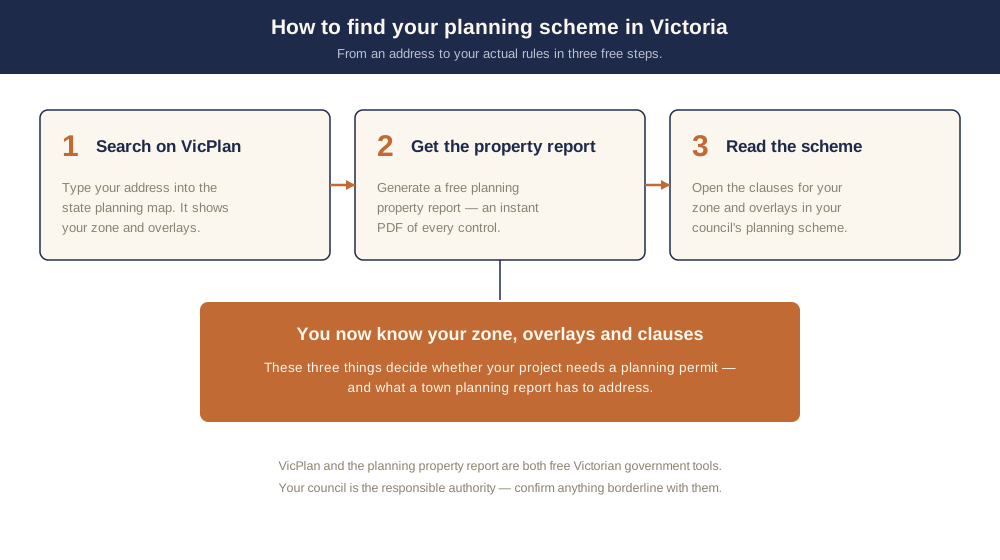
Figure 1: Search your address, generate the property report, then read your zone and overlays in the scheme.
What is a planning scheme?
A planning scheme is a statutory document that controls the use, development and protection of land. Each municipality in Victoria is covered by one planning scheme — there are roughly 79 across the state, named for the council (for example, the Yarra Planning Scheme or the Casey Planning Scheme).
Most of what's inside is standard statewide content drawn from the Victoria Planning Provisions (the VPP) — a master template that is not itself a planning scheme and applies to no land on its own. Your council selects the relevant zones and overlays from the VPP, adds local policy, and tailors certain rules through schedules. That's why the structure is identical from one scheme to the next, but the detail on your block is local.
Step 1: Find your controls on VicPlan
Spend 5 minutes, not 3 weeks
instantplanning generates a council-ready town planning report for Victorian permits. No town planner. No waiting.
Get your report →VicPlan is the state's online planning map. Type your address into the search box, select your property, and it highlights the land and shows the zone and overlays that apply. Zones and overlays become visible at a map scale of 1:25,000 or closer, so zoom in if you don't see them at first.
VicPlan also lets you turn individual layers on and off, measure distances and areas, and — most usefully — generate a planning property report for the selected property. For a plain-English walk-through of every permit trigger, see what triggers a planning permit in Victoria.
Step 2: Generate a free planning property report
The quickest written summary is the planning property report. Enter your address, select it, and the system creates a report you can download as a PDF.
The report sets out your property's planning zone, every overlay affecting the land, and links into the relevant sections of your scheme. It's the single most useful document to pull before any project — and the same data we use to build a town planning report. Whether your works are even caught by the scheme is a separate question we cover in what's exempt from a planning permit in Victoria.
Step 3: Read your zone and overlay codes
Your report and VicPlan both show controls as short codes. The two that matter most are your zone and your overlays — they tell you different things.
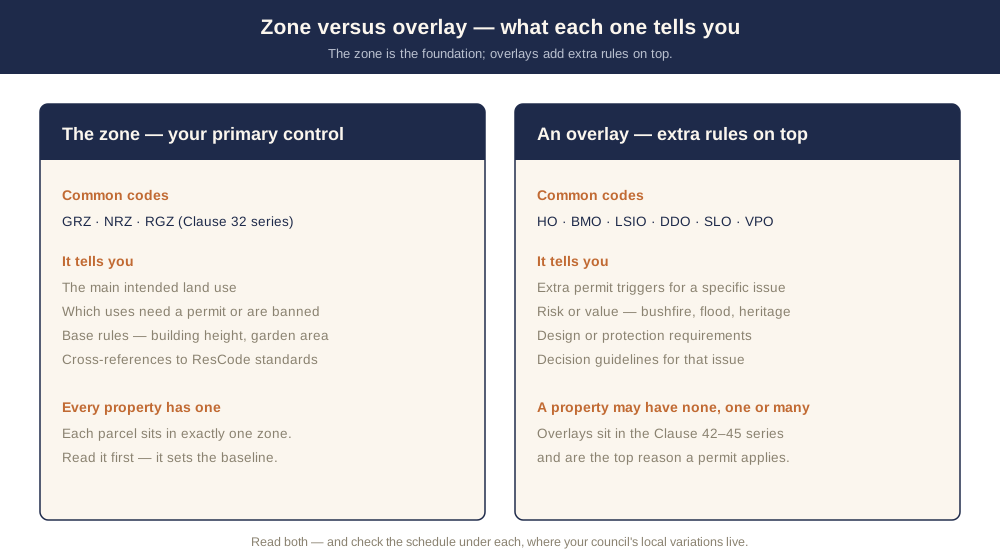
Figure 2: The zone is your primary control; overlays add extra rules for heritage, bushfire, flood and similar issues.
The zone is the primary control. It sets the main land use, says which uses need a permit, and carries base development rules such as building height and garden area. The common residential codes are GRZ (General Residential Zone), NRZ (Neighbourhood Residential Zone) and RGZ (Residential Growth Zone). Zones sit in the Clause 32 series of the scheme — GRZ at Clause 32.08, NRZ at 32.09 and RGZ at 32.07.
An overlay sits on top of the zone and adds extra, issue-specific controls — usually for risk, character or environmental value. Common codes include HO (Heritage Overlay, Clause 43.01), BMO (Bushfire Management Overlay, Clause 44.06), LSIO (Land Subject to Inundation Overlay, Clause 44.04), DDO (Design and Development Overlay, Clause 43.02), SLO (Significant Landscape Overlay, Clause 42.03) and VPO (Vegetation Protection Overlay, Clause 42.02). Overlays are in the Clause 42–45 series, and they are the most common reason an otherwise-exempt project needs a permit.
Step 4: Open the clauses in the scheme
Once you know your codes, you can read the actual rules online. Your council's planning scheme is published at planning-schemes.app.planning.vic.gov.au, and the property report links straight into the relevant clauses.
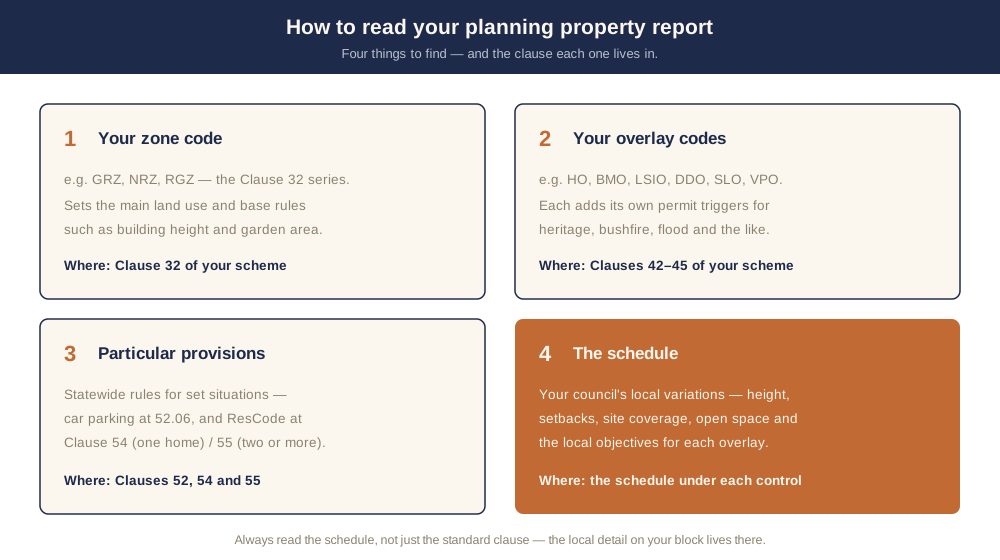
Figure 3: The four things to read on every report — your zone, your overlays, the particular provisions, and each schedule's local variations.
Beyond zones and overlays, two more parts of the scheme matter. Particular provisions sit in the Clause 52 series and set extra triggers for defined situations — for example, car parking at Clause 52.06. The residential design standards known as ResCode live at Clause 54 (one dwelling on a lot) and Clause 55 (two or more dwellings).
Finally, almost every zone and overlay has a schedule — the part your council fills in with local variations. A schedule can change rules such as building height, street setback, site coverage or private open space, and it sets the specific objectives for an overlay in your area. Always read the schedule, not just the standard clause, because that's where the local detail lives. The scheme is interpreted under the Planning and Environment Act 1987, and your council — the responsible authority — has the final say, so confirm anything borderline with them.
Putting it together
If, after reading your zone, overlays and clauses, your project needs a planning permit, your application is far stronger — and far less likely to be returned or hit a Request for Further Information — when it comes with a town planning report addressing your specific controls and the relevant ResCode standards.
Hiring a town planner can take weeks. instantplanning builds the same council-ready report from current Victorian planning scheme data in minutes — you review it before you lodge. Start by checking whether you even need a permit in do I need a planning permit in Victoria, or just generate your report.
Frequently asked questions
How do I find my planning scheme in Victoria?
Is the planning property report free?
How do I read my zone and overlay codes?
Where are the actual planning rules written?
What is a schedule and why does it matter?
How many planning schemes are there in Victoria?
Ready to generate your report?
Skip the writing. Get a council-ready town planning report in 5 minutes.
Get your report