Key takeaways
- ✓The Vegetation Protection Overlay sits at Clause 42.02 and protects significant vegetation specified in its schedules.
- ✓A planning permit is required to remove, destroy or lop any vegetation specified in the relevant schedule.
- ✓Clause 42.02-3 contains a table of exemptions, and each numbered schedule (VPO1, VPO2 and so on) adds its own triggers and exemptions.
- ✓The overlay operates alongside Clause 52.17 native vegetation controls, so both can apply to the same tree.
- ✓Check VicPlan at mapshare.vic.gov.au/vicplan to confirm your overlay and schedule number before you remove a tree.
What does a Vegetation Protection Overlay (VPO) mean for my property in Victoria?
If your property is covered by a Vegetation Protection Overlay (VPO) under Clause 42.02 of the Victoria Planning Provisions, your council has identified vegetation on or around the land as significant and worth protecting. The overlay means you generally need a planning permit before you remove, destroy or lop the vegetation that the schedule specifies.
Get a council-ready town planning report in 5 minutes — no town planner, no waiting.
Get your report →- ✓What a Vegetation Protection Overlay protects and why councils apply it
- ✓When a VPO triggers a planning permit
- ✓The exemptions in the overlay and in each schedule
- ✓How a VPO works alongside the native vegetation controls
- ✓How to check your own property in minutes
The short answer
A Vegetation Protection Overlay (VPO) is a control at Clause 42.02 that protects significant vegetation specified in its schedules. A planning permit is required to remove, destroy or lop that vegetation, subject to a table of exemptions in the overlay and further exemptions in each numbered schedule such as VPO1 or VPO2.
The overlay is a framework. Each schedule states the nature and significance of the vegetation it protects and the vegetation protection objectives for the area. That is why a VPO can mean broad habitat protection on one property and protection of a specific treeline on another.
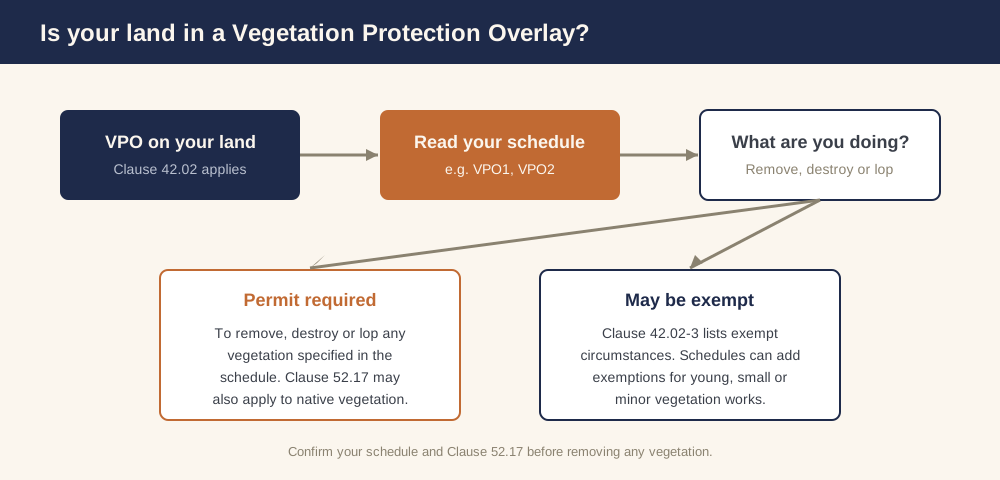 Figure 1: How a Vegetation Protection Overlay leads to a permit decision.
What does a Vegetation Protection Overlay protect?
The purpose of Clause 42.02 is to protect areas of significant vegetation, ensure development minimises loss of vegetation, preserve existing trees and other vegetation, recognise vegetation protection areas as places of natural beauty and importance, maintain and enhance habitat and habitat corridors for indigenous fauna, and encourage the regeneration of native vegetation.
A schedule to the overlay must specify the vegetation to be protected, with a statement of its nature and significance and the protection objectives to be achieved. Schedules commonly target areas where substantial vegetation cover is the dominant feature, or specific significant species, treelines and habitat areas.
When do I need a planning permit under a VPO?
Spend 5 minutes, not 3 weeks
instantplanning generates a council-ready town planning report for Victorian permits. No town planner. No waiting.
Get your report →The permit requirement is direct. Under Clause 42.02-2, a permit is required to remove, destroy or lop any vegetation specified in a schedule to the overlay. Lopping includes substantial pruning, so works you might think of as routine can still be caught.
- ✓Removing a tree or shrub the schedule protects
- ✓Destroying vegetation, including by ringbarking or poisoning
- ✓Lopping or heavy pruning of protected vegetation
- ✓Clearing for a driveway, building or fence, beyond any scheduled allowance
This requirement is in addition to any native vegetation permit trigger under Clause 52.17, so for native vegetation you should check both. A town planning report sets out exactly which triggers apply to your site.
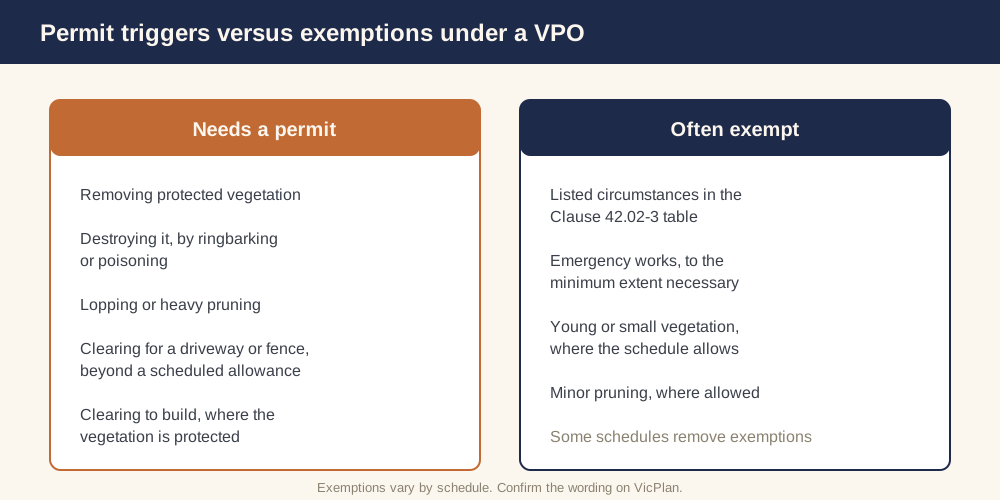 Figure 2: Vegetation work that needs a permit versus activities often exempt.
What is exempt from a VPO permit?
Clause 42.02-3 contains a table of exemptions where no permit is required to remove, destroy or lop vegetation to the minimum extent necessary in specified circumstances, such as certain emergency works and specified public authority works. Where the table says a permit is not required, the permit trigger does not apply.
The overlay also does not apply to removal of native vegetation carried out in accordance with a native vegetation precinct plan specified in the schedule to Clause 52.16.
Each numbered schedule can add its own exemptions, for example vegetation below a stated age or height, minor pruning, or clearing within defined limits for a driveway or fence. Some schedules deliberately remove a general exemption and apply stricter controls, such as no exemption for vegetation less than ten years old. Because exemptions vary, always check the schedule that applies to your land.
How does a VPO work with the native vegetation rules?
Clause 52.17 requires a planning permit to remove, destroy or lop native vegetation unless a specified exemption applies. The VPO and Clause 52.17 operate in parallel. If your vegetation is native, Clause 52.17 may require a permit in addition to the VPO. The overlay defers to a native vegetation precinct plan under Clause 52.16, but it does not override Clause 52.17.
In practice, a landowner with native vegetation must check both the overlay schedule and Clause 52.17 to confirm every trigger and exemption before doing any work.
Can I use the VicSmart fast-track in a VPO?
Yes, in some cases. Clause 42.02 notes that, subject to Clause 71.06, applications for some works listed in a VicSmart table are VicSmart applications and are assessed against the VicSmart provisions. State guidance confirms VicSmart can be used for tree removal and lopping where the proposal meets the relevant VicSmart class criteria, for example removal of a single tree that satisfies the checklist and locational requirements.
VicSmart eligibility depends on the class and criteria in the scheme, so confirm it for your specific proposal before relying on the faster pathway.
How do numbered schedules (VPO1, VPO2) change the rules?
The overlay is shown on planning scheme maps as VPO with a number. Each schedule can vary which vegetation is protected, the permit triggers, the exemptions, and the application requirements and decision guidelines. One schedule might protect broad habitat areas while another protects a specific treeline; one might apply only to vegetation above a certain height or diameter while another protects everything. Your schedule number is the key to knowing exactly what applies.
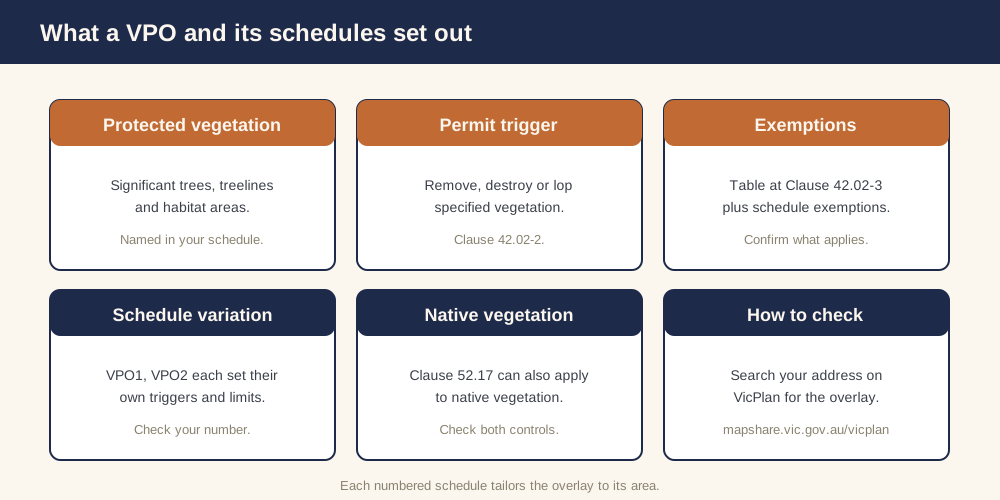 Figure 3: What a VPO and its schedules set out.
How do I check whether my property has a VPO?
You can confirm the overlay yourself in a few minutes:
- ✓Open VicPlan at mapshare.vic.gov.au/vicplan and search your address.
- ✓Generate the planning property report, which lists every zone and overlay, including any Vegetation Protection Overlay and its schedule number.
- ✓On planning.vic.gov.au, open Clause 42.02 and the exact schedule (for example VPO1) that applies to your land.
- ✓Read the schedule's protected vegetation, permit triggers and exemptions, and check Clause 52.17 if the vegetation is native.
Together, Clause 42.02, your schedule, Clause 52.17 and the VicSmart tables tell you what you can remove and what approval you need.
Hiring a town planner can take weeks. instantplanning builds the same council-ready report from current Victorian planning scheme data in minutes — and you review it before you lodge. When you are ready, generate your report.
Ready to generate your report?
Skip the writing. Get a council-ready town planning report in 5 minutes.
Get your report